AI automation for virtual assistants is one of the biggest missed opportunities in small business operations. Most VAs handle tasks manually. They copy data between apps, send follow-up emails one at a time, update spreadsheets by hand, and create the same reports from scratch every week. Meanwhile, tools like Zapier, Make, and Airtable sit unused or underused because nobody gave the VA permission (or guidance) to build the workflows themselves.
This isn’t about turning your VA into a software developer. It’s about giving them the tools and the boundaries to eliminate their own repetitive work so they can focus on the stuff that actually needs a human brain. If you’re wondering what a virtual assistant actually does beyond basic admin tasks, automation capability is increasingly part of the answer.
The question isn’t whether your VA should build automations. The question is which ones, and how do you draw the line between what they can own independently and what needs your sign-off first.
This post gives you a clear framework for answering that question.
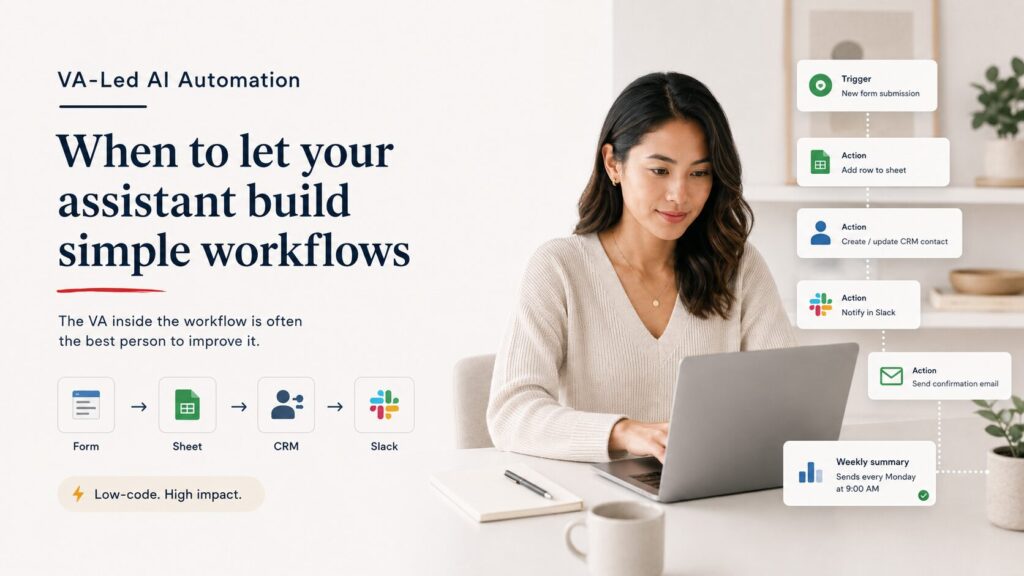
Why VA Building Workflows Makes Business Sense
A VA who builds their own simple automations is worth significantly more than one who doesn’t. Here’s the math.
Let’s say your VA spends two hours a week on tasks that could be automated: copying form submissions into a spreadsheet, sending confirmation emails to new leads, tagging contacts in your CRM based on which page they visited, and posting a weekly summary to Slack. That’s roughly 100 hours a year of work that a well-built Zap or Make scenario could handle in seconds.
But the value goes beyond time savings. When your VA builds the automation, they understand the workflow better than anyone. They know the edge cases. They know which leads need special handling. They know when the automation should stop and a human should step in. That knowledge is hard to replicate if someone else builds the system on their behalf.
This is what makes AI automation for virtual assistants fundamentally different from hiring a developer to build your systems. The VA lives inside the workflow.
The AI-ready VA doesn’t just run tools. They improve how work flows through the business. Low code automations are the most practical way for a non-technical person to do that. When you hire a virtual assistant in 2026, automation skills should be near the top of your screening criteria.
The AI Automation for Virtual Assistants Ownership Spectrum: What They Can Build vs. What Needs You
Not all automations carry the same risk. A Zap that posts new blog titles to a Slack channel is a very different thing from an automation that sends pricing proposals to prospects. The first one can break without anyone noticing for days. The second one can lose you a deal in minutes.
Here’s a simple way to think about it. Every automation falls somewhere on a spectrum between “low risk, let them own it” and “high stakes, you need to approve the logic before it goes live.”
Automations Your VA Can Own Outright
These share three traits: the output is internal or low-visibility, the consequences of a mistake are minor and reversible, and the workflow follows a predictable pattern with few exceptions.
Internal notifications. When a new form submission comes in, send a Slack message to the team. When a task is marked complete in the project management tool, update a status tracker. When a meeting is booked, add it to the shared calendar and notify the relevant people. None of these touch clients directly. If one breaks, you lose a notification. That’s it.
Data entry and syncing. When a new contact is added to one system, create a matching record in another. When a row is added to a spreadsheet, push that data to the CRM. When a file is uploaded to a shared drive, move it to the correct client folder. These are the automations that eliminate the boring copy-paste work your VA is doing manually right now.
Internal reporting. Pull data from multiple sources into a single dashboard or report template on a set schedule. Compile weekly metrics into a Notion page or Google Doc. Summarize completed tasks from the project management tool into a weekly digest. This is where AI-assisted tools like ChatGPT and Claude start to add real power, because your VA can include an AI step that summarizes or formats the data before it lands in the report.
File organization. Automatically rename, tag, or route files based on naming conventions. Archive completed project folders. Sort incoming documents by client or type. Low risk, high time savings, and the VA knows the filing logic better than anyone.
All of these are strong starting points for VA building workflows independently. They’re predictable, internal, and low-consequence.
VA-Led AI Automation: Automations Your VA Should Build but You Should Review
These are workflows where the output is visible to clients or prospects, where the data involved is sensitive, or where the business logic has enough exceptions that you want to confirm the rules before it goes live.
Lead routing and tagging. When a new lead fills out a form, score them based on their answers and route them to the right pipeline stage. This is a great candidate for VA building workflows because your VA handles leads daily and knows the patterns. But because the routing logic directly affects who gets contacted and how quickly, you should review the rules before the automation goes live.
Client-facing email sequences. Automated follow-ups after a discovery call. Onboarding email sequences for new clients. Reminder emails before a meeting. Your VA can draft these and build the automation, but you should approve the copy and review the trigger logic. A badly timed or poorly worded automated email erodes trust fast.
CRM pipeline automations. Moving deals between stages based on activity. Triggering tasks when a deal reaches a certain stage. Flagging stale opportunities. The logic here can get complex, and a wrong rule can mess up your pipeline data. Let your VA propose the workflow, build it in draft mode, and walk you through it before you flip the switch.
Social media scheduling and repurposing. Automatically pulling blog post titles into a social content calendar. Reformatting content snippets for different platforms. Scheduling posts based on a predefined cadence. The repurposing logic is safe for your VA to own, but anything that publishes content publicly should go through your approval process first.
Automations That Should Stay with You (or a Systems Specialist)
Some workflows are too complex, too high-stakes, or too tightly connected to business strategy for a VA to own the build.
Payment and invoicing automations. Anything involving money should be built by someone with systems expertise and reviewed carefully. A misconfigured automation that sends the wrong invoice amount or charges a client twice creates a real problem. If your business needs payment automations, that’s a job for a systems implementation team like NextLayer Co. that can build, test, and monitor it properly.
Multi-branch conditional workflows. When the logic involves more than three or four “if this, then that” branches, the automation gets fragile. Each branch is a potential failure point. VAs can handle simple linear automations well. Multi-branch workflows need someone who understands error handling, fallback paths, and monitoring.
Workflows that touch compliance-sensitive data. Medical records, financial documents, legal agreements, personally identifiable information. These need security protocols, data handling rules, and audit trails that go beyond what most no-code tools offer out of the box.
Infrastructure-level integrations. Connecting your website to your CRM, setting up webhook-based triggers, configuring API authentication, building custom integrations between tools that don’t have native connectors. This is technical systems work, not VA territory.
Low Code Automations Tools That Make AI Automation for Virtual Assistants Practical
Your VA doesn’t need to learn Python. They need to learn the right low code automations platform and understand when to use which features.
Zapier
The entry point for most VAs. Zapier connects over 7,000 apps through a simple trigger-and-action model. Your VA picks a trigger (something happens in one app), defines one or more actions (something happens in other apps), and the Zap runs automatically.
Where it works well: simple, linear workflows. “When X happens, do Y.” New form submission creates a CRM contact. New calendar event sends a Slack reminder. New spreadsheet row triggers an email.
Where it gets limited: complex branching logic, high-volume data processing, and scenarios where you need granular error handling.
Best for: VAs who are new to automation and need quick wins with minimal learning curve.
Make (formerly Integromat)
Make handles more complexity than Zapier. The visual scenario builder lets your VA map out multi-step workflows with branches, filters, loops, and error routes. It’s more powerful, but it takes longer to learn.
Where it works well: workflows with conditional logic, data transformations, and multiple connected steps. “When a lead fills out this form and their budget is above a certain amount, route them to pipeline A. If below, route to pipeline B. In both cases, log the data and notify the team.”
Where it gets limited: very technical integrations that need custom API work.
Best for: VAs who have mastered Zapier and need to handle more sophisticated workflows.
Airtable
Airtable combines a flexible database with built-in automation features. Your VA can create automations directly inside the tool they’re already using for data management, which reduces the learning curve.
Where it works well: data-centric workflows where the information already lives in Airtable. Content calendars, client trackers, project pipelines, task boards.
Where it gets limited: workflows that need to pull data from many external sources or trigger actions outside the Airtable ecosystem.
Best for: VAs who already manage data in Airtable and want to add automation without switching to a separate platform.
AI Steps Inside Automation Tools
This is where things get interesting. Both Zapier and Make now offer built-in AI steps. Your VA can add a step to the workflow that sends data through ChatGPT or Claude, processes it, and passes the result to the next step.
Real examples: a meeting transcript lands in Google Drive, the automation sends it through an AI summarization step, the summary posts to a Notion page, and a Slack message notifies the team. Or: a new blog post is published, an AI step generates three social media captions in different tones, and the captions land in the VA’s social scheduling tool for review.
These low code automations with built-in AI steps represent the practical ceiling for most VAs, and it’s a high ceiling. This combination of automation and AI tools is where the real productivity gains are. The automation handles the plumbing. The AI handles the thinking. The VA handles the judgment. The line between virtual assistants and AI gets blurry here, and that’s exactly the point.
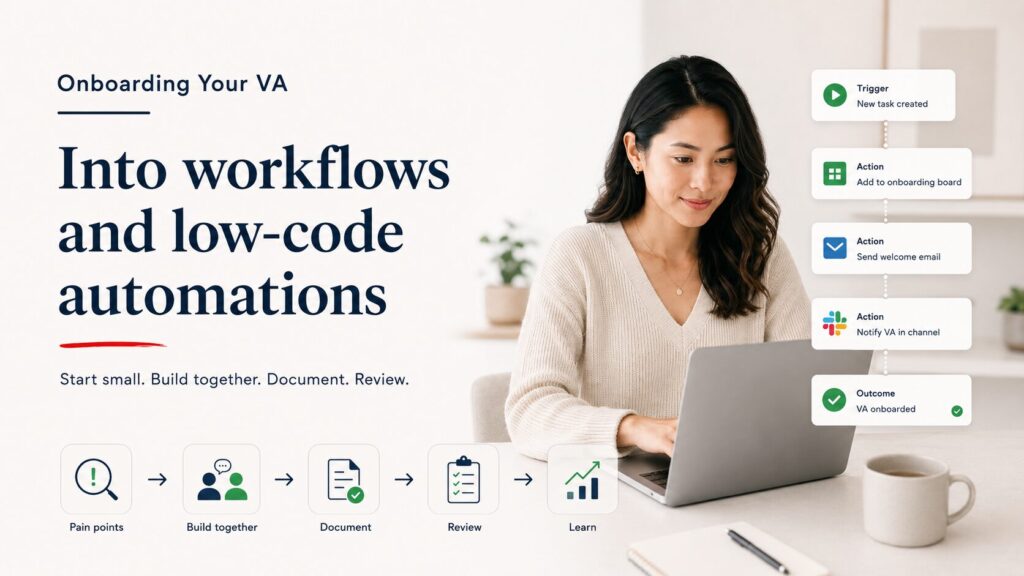
How to Onboard Your VA Into Building Workflows and Low Code Automations
Handing your VA a Zapier login and saying “automate stuff” will fail. Here’s how to do it properly.
Step 1: Start with Their Pain
Ask your VA to list the five tasks they do most often that feel repetitive. Not the tasks you think should be automated. The tasks they find tedious. They’ll be more motivated to build automations for work they personally want off their plate, and they’ll understand the workflow deeply enough to build it correctly.
This is the foundation of any successful AI automation for virtual assistants rollout: start where the friction already exists.
Step 2: Pick One Workflow and Build It Together
Sit with your VA (screen share works fine) and build the first automation together. Walk through the trigger, the logic, the actions, and the test. Explain why you’re making each choice. This one session teaches more than any course because it uses their real work, their real tools, and their real data.
Step 3: Document the Pattern
After the first automation is live, have your VA write a short doc covering what it does, what triggers it, what it produces, and what to check if it stops working. This becomes the first entry in an automation log that grows as they build more workflows.
If you’ve already trained your VA to handle AI tools, adding automation is a natural next step. The prompting skills, output review habits, and documentation practices transfer directly. Need help finding a VA who already comes with these skills? See how Steun’s process works.
Step 4: Set a Review Cadence
For the first month, review every new automation before it goes live. After that, shift to reviewing only the ones that are client-facing or involve sensitive data. By month three, your VA should be building and deploying internal automations independently.
Step 5: Give Them a Budget for Learning
Most automation platforms have free tiers and excellent documentation. But investing in a short course can accelerate the learning. Zapier and Make both offer free certification programs. Budget a few hours of your VA’s time in the first two weeks specifically for platform tutorials and practice scenarios.
Common Mistakes When VAs Start Building Low Code Automations
Building Too Many Automations at Once
One well-built automation that saves 30 minutes a week is worth more than ten half-finished ones that nobody trusts. Start with one. Get it stable. Then build the next.
Not Testing with Real Data
An automation that works in test mode can break with real-world data. Field formats change. Required fields get left blank. Edge cases appear. Your VA should test every automation with actual data, not sample data, before it goes live.
No Error Handling
When an automation step fails, what happens? If the answer is “nothing, and nobody knows,” that’s a problem. Even simple low code automations should have a notification step that alerts the VA when something breaks. Both Zapier and Make support this.
Automating a Broken Process
If the underlying workflow doesn’t make sense, automating it just makes it break faster. Before building, your VA should map the manual process and confirm the logic is sound. Automation amplifies whatever it touches, including the problems.
Skipping the Documentation
If the VA who built the automation leaves and nobody knows how it works, you’re stuck. Every automation needs a one-paragraph description, a list of connected tools, and notes on what to check if it stops. This is non-negotiable. It’s a lesson that applies broadly to cost-effective outsourcing in general: if it’s not documented, it’s not transferable.
AI Automation for Virtual Assistants at Different Business Stages
Solo Operator with One VA
Your VA picks up internal low code automations first: data syncing, notifications, report generation. You review anything client-facing. The goal is to free up three to five hours per week of manual work within the first month.
Small Team with Two or Three VAs
One VA becomes the automation lead. They build and maintain the workflow library. Other VAs request automations through a simple intake process. The automation lead documents everything and trains team members on how to use (not build) each workflow. If you’re running a team like this through a managed VA solution, your provider should be helping you identify these internal efficiency opportunities.
Growing Business Ready for Systems Infrastructure
At this stage, your VA is handling the simple to mid-tier automations. The complex, multi-branch, infrastructure-level workflows should be handed to a systems specialist like NextLayer Co. who can build, test, and monitor them properly. Your VA maintains and iterates on the simpler workflows while the specialist handles the heavy build work. This split is how you scale operations without overloading any one person.
The Safety Checklist: What to Confirm Before Any AI Automation Goes Live
Before your VA deploys a new automation, run through this list together.
Does this touch client data? If yes, confirm data handling rules. No client PII should pass through tools that aren’t covered by your privacy policy.
Does this send anything externally? If yes, review the content and confirm the trigger logic. A runaway automation that sends 500 emails in five minutes is a real scenario, not a hypothetical.
Is there an error notification? If a step fails, does someone get alerted? If not, add that step before deploying.
Is it documented? Can someone who didn’t build it understand what it does and how to fix it?
Has it been tested with real data? Not sample data. Real data with real edge cases.
Is there a way to turn it off quickly? If something goes wrong, can the VA pause the automation immediately without needing your help?
If every answer is yes, deploy it. If any answer is no, fix that gap first.
Frequently Asked Questions About AI Automation for Virtual Assistants
How technical does my VA need to be to build automations?
Not very. Zapier is designed for non-technical users, and most VAs can build their first working automation within a few hours of starting. Make has a steeper learning curve but is still manageable for someone comfortable with logic (if this, then that). Your VA doesn’t need coding skills. They need patience, attention to detail, and a willingness to test. The barrier to entry for AI automation for virtual assistants is lower than most business owners assume.
What if my VA builds something that breaks?
That’s why error notifications exist. Every automation should include a step that alerts the VA when something fails. Breaks are normal, especially early on. The question isn’t whether it will break. It’s whether your VA will know about it and know how to fix it.
Should I pay my VA more if they’re building automations?
Yes. A VA who builds and maintains automations is delivering more value than one who runs tasks manually. This is a skill upgrade that directly reduces your operational costs. Compensate accordingly. For more on what to look for in a modern VA, check out these AI-proof skills for virtual assistants.
Can my VA handle automation for multiple clients?
If you run an agency or manage multiple brands, your VA can absolutely build and maintain automations across clients. Just make sure each client’s automations are documented separately, access credentials are managed properly, and your VA has a system for tracking which automations belong to which client.
How many automations should we build in the first month?
Three to five solid ones. Quality matters more than quantity. Each one should be tested, documented, and stable before moving to the next.
Getting Structured Help with This
If you’re clear on what you need but want a VA who already knows how to run AI tools and build simple workflows, Steun Outsourcing provides managed VA support with built-in operational readiness. You skip the months of training and start with someone who can execute.
If the issue isn’t staffing but systems, if your workflows are messy, your tools don’t talk to each other, or you need backend infrastructure built before a VA can automate anything, NextLayer Co. handles that layer. And if you’re still trying to figure out whether the bottleneck is people, processes, or both, start with a conversation to get clarity before you build.