Most virtual assistants now use AI every working day. They draft emails in ChatGPT, summarize call notes, clean up spreadsheets, and turn messy voice memos into task lists.
That’s a good thing. Used well, AI makes a capable VA faster and more consistent.
But there’s a question many teams skip: what exactly is going into those tools?
Every prompt is a small data transfer. When a VA pastes a client’s inbox thread, a customer list, or a contract into an AI tool, that information leaves the business’s own systems and lands on someone else’s servers. Usually nothing bad happens. Sometimes it creates a privacy problem nobody notices until much later.
This guide covers AI data privacy from a practical, operational angle. It explains what VAs should never put into AI tools, what needs approval first, what is generally safe, and how founders can turn all of this into a simple system instead of a vague “be careful.”
Why AI Data Privacy Is Now Part of the VA Job
A VA’s work sits right in the middle of a business’s most sensitive information. Inboxes. Calendars. Client records. Invoices. Passwords. HR files. Customer support tickets.
That access is the whole point of delegation. It’s also why AI safety for virtual assistants matters more than it does for most roles.
The risk is rarely malicious. It’s convenience. A VA is behind on a task, the AI tool is open in another tab, and pasting the whole document in is the fastest route to done.
That’s essentially how one of the most widely reported AI data incidents happened. In 2023, Samsung restricted staff use of generative AI tools after engineers uploaded sensitive internal code to ChatGPT. Nobody was trying to leak anything. They were trying to get work done.
A small business doesn’t have Samsung’s security team. If a VA pastes a client’s customer database into a free AI account, there’s often no one watching, no log, and no policy that says it shouldn’t have happened.
That’s not a people problem. It’s a systems problem.
What Actually Happens to What You Type Into AI Tools
You don’t need to be technical to understand the basics. You just need to know that AI tools handle data differently depending on the account type and settings.
Using ChatGPT as an example, here’s what OpenAI’s own documentation says:
- Personal accounts may be used for training by default. On individual plans, conversations can be used to improve OpenAI’s models unless you turn off “Improve the model for everyone” under Settings → Data controls. OpenAI’s data controls guide walks through the steps for web and mobile.
- Feedback can override your opt-out. OpenAI notes that if you give a thumbs up or thumbs down on a response, the whole conversation tied to that feedback may be used for training, even after opting out.
- Temporary Chat helps, but isn’t invisible. According to OpenAI’s Temporary Chat FAQ, these chats don’t appear in your history and aren’t used for training, but a copy may be kept for up to 30 days for safety purposes.
- Business plans work differently. OpenAI’s enterprise privacy page states that data from ChatGPT Business, Enterprise, and the API isn’t used for training by default, and workspace admins get more control over retention and access.
Two takeaways matter here.
First, the account a VA uses changes the risk. A personal free account with default settings is not the same as a business workspace the client controls.
Second, even the safest setting is not a deletion button. Settings reduce exposure. They don’t make it zero. Other AI tools have their own policies, and those policies change, so check the current terms of anything you use.
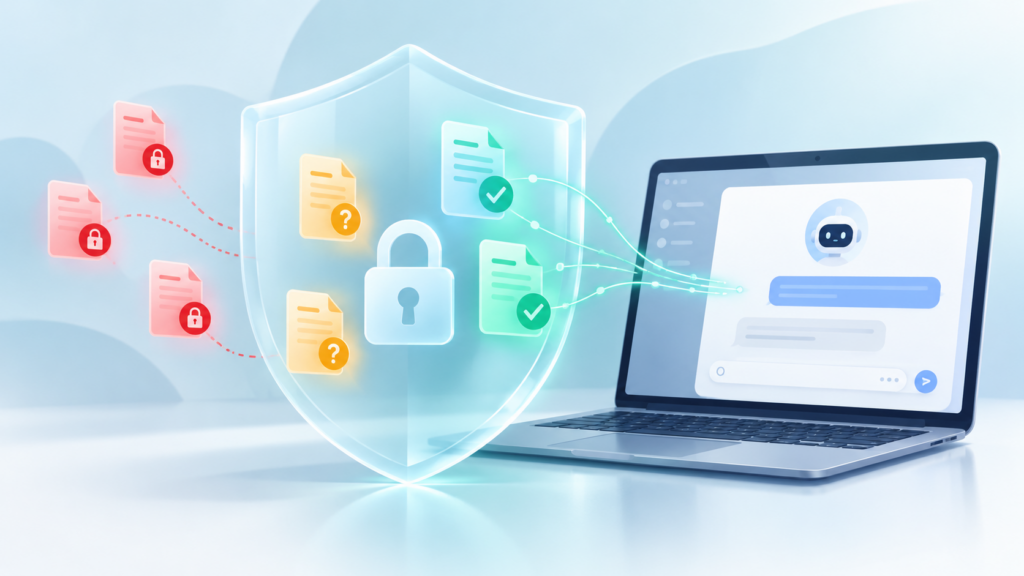
The Three-Tier Rule: Never, Ask First, Generally Safe
The simplest way to manage AI data privacy is to sort information into three tiers before it goes anywhere near a prompt.
Tier 1: Never Put This Into an AI Tool
These items should stay out of general AI tools entirely, regardless of account type, unless the client has set up a specific approved system for them.
- Passwords, login credentials, API keys, and 2FA codes. There’s no task that requires them in a prompt.
- Payment and banking details. Card numbers, bank account numbers, and payment portal access.
- Government-issued ID numbers. Passport, driver’s license, tax, and social security numbers.
- Health and medical information. About clients, their customers, or their staff.
- Full customer or lead databases. Exported CRM lists, email lists, and order histories with names and contact details.
- HR and personnel records. Salaries, performance reviews, disciplinary notes, and contracts.
- Legal matters. Active disputes, settlement terms, and anything under attorney-client privilege.
- Anything covered by an NDA that doesn’t explicitly allow AI processing.
If you wouldn’t post it in a public group chat, don’t paste it into an AI tool on a personal account.
Tier 2: Ask First and Use the Right Setup
This is the gray zone where most real work happens. These items can sometimes go into AI tools, but only with the client’s explicit approval and the right setup, ideally a business workspace the client owns.
- Internal documents such as strategy notes, pricing models, and financial summaries.
- Client email threads that include third-party names and contact details.
- Meeting recordings and transcripts.
- Draft proposals and contracts.
- Unreleased product, launch, or campaign details.
- Proprietary processes and internal SOPs.
The key word is “ask.” A VA shouldn’t decide alone whether a client’s pricing strategy can go into an AI tool. That decision belongs to the business owner.
Tier 3: Generally Safe
This covers most of the everyday value VAs get from AI, and it carries very little privacy risk.
- Public information, such as published blog posts, website copy, and public announcements.
- Generic templates, such as “write a polite follow-up email for an overdue invoice.”
- Your own writing that contains no client or customer data.
- Formatting, grammar, and tone edits on already-anonymized text.
- Brainstorming, outlines, and research on general topics.
- Process questions, such as “what’s a good structure for a weekly client report?”
Notice the pattern: the more generic the input, the safer it is. That leads to the most useful habit a VA can build.
How to Anonymize Before You Prompt
Most tasks don’t actually need real names, numbers, or identifiers. The AI only needs the structure of the problem.
Here’s a simple before-and-after.
Before (risky):
“Write a reply to Maria Santos at maria@example.com. She’s upset her invoice #4471 for ₱38,500 was charged twice to her card ending 2291.”
After (safe):
“Write a calm, apologetic reply to a client who was double-charged on an invoice. Confirm we’re investigating and will refund the duplicate within a set timeframe. Keep it under 120 words.”
The second prompt produces an equally useful draft. The VA then adds the real name and details back in, inside the client’s own email system.
A few practical anonymization habits:
- Swap names for roles. “Client,” “Customer A,” “Vendor,” “Team member.”
- Remove contact details completely. Emails, phone numbers, and addresses rarely affect the output.
- Round or remove numbers. Use “a mid-sized invoice” instead of the exact amount, unless the math matters.
- Describe instead of paste. Summarize the situation in two sentences rather than pasting a 40-message thread.
- Strip attachments before uploading. If you must upload a document, remove sensitive columns and pages first.
This takes about thirty extra seconds per task. It removes most of the risk.
Secure Use of ChatGPT: A VA Settings Checklist
If ChatGPT is part of your workflow, these steps support the secure use of ChatGPT on client work.
- Use the client’s workspace when one exists. If the business has a ChatGPT Business or Enterprise account, work inside it, not on your personal account.
- Turn off model training on personal accounts. Go to Settings → Data controls and switch off “Improve the model for everyone.”
- Skip the feedback buttons on client work. Feedback can send the conversation for training even when you’ve opted out.
- Use Temporary Chat for one-off tasks. It keeps work out of your history and out of training, with the 30-day safety retention noted above.
- Keep client work separate. Don’t mix multiple clients’ information in the same conversation, project, or custom GPT.
- Review memory and custom instructions. Make sure saved memories don’t contain client details that could surface in unrelated chats.
- Secure the account itself. Use a strong, unique password and two-factor authentication. A compromised AI account exposes every conversation in it.
- Delete conversations you no longer need. Clean history means less exposure if an account is ever accessed.
The same thinking applies to Claude, Gemini, Copilot, and AI features built into tools like Notion, Canva, and email platforms. Check where the data goes, whether it’s used for training, and who controls the account.
The Legal Layer: Data Privacy Laws Still Apply
AI tools don’t create a legal gray zone where privacy rules stop applying.
For Philippine-based VAs, the Data Privacy Act of 2012 (Republic Act 10173) is the baseline. A few parts of it are directly relevant to AI use:
- The law lists categories of sensitive personal information, including health, education, government-issued identifiers, and tax returns. These line up closely with Tier 1 above.
- When a business outsources data processing, the business remains responsible for safeguards, and the processor, meaning the person or company doing the work, must also comply.
- People involved in processing personal information must keep it under strict confidentiality, and that duty continues after the contract ends.
Clients based abroad may also be subject to privacy rules in their own countries, which can cover their customers’ data wherever it’s handled.
This isn’t legal advice. If you handle regulated data such as health records, financial accounts, or data from strict-regulation regions, the client should get proper legal guidance on approved tools and processes. But the operational takeaway is simple: “the AI tool did it” is not a defense.
For Founders: Your VA Needs an AI Use Policy
Here’s the part most businesses miss.
If a VA puts sensitive data into an AI tool, it’s tempting to call it a VA mistake. Often it’s a missing system. Nobody told them where the line was.
Delegation doesn’t work without clear systems, and AI use is no exception. If the rules about client data only live in your head, your team is guessing.
A useful AI use policy doesn’t need to be long. One page is enough if it covers:
- Approved tools. Which AI tools the team may use for client work, and which account type.
- Data tiers. Your version of Never, Ask First, and Generally Safe, with examples from your own business.
- Account rules. Business workspace versus personal accounts, training settings, and two-factor authentication.
- Approval path. Who to ask when something is in the gray zone, and how quickly they’ll respond.
- Incident steps. What to do if sensitive data was shared by mistake, including who to tell and how fast.
- Review cadence. When the policy gets updated, since AI tools change their terms often.
Treat it like any other SOP. Asana’s SOP template guide is a useful structure if you’re starting from zero.
If your processes, approvals, and rules are still undocumented, that’s the deeper issue. Operating Memory Company focuses on capturing exactly that kind of knowledge, so your team isn’t relying on what currently lives only in the founder’s head.
If you’re hiring or scaling a VA team, structure matters from day one. Steun Outsourcing provides managed VA support built around clear operational processes, including how AI fits into the work.
And if you want AI connected directly to your systems, such as automations that pull from your CRM or summarize support tickets, that’s an infrastructure decision, not a copy-paste habit. NextLayer Company builds automation infrastructure with that kind of setup in mind.
Common AI Data Privacy Mistakes VAs Make
Even careful VAs slip into a few patterns. Watch for these:
- “It’s just a summary.” Summarizing a meeting transcript still sends the whole transcript.
- “I deleted the chat.” Deletion helps, but retention windows and earlier training settings may still apply.
- “The client uses AI too.” Their personal habits aren’t your approval. Ask about their client data specifically.
- “It’s a browser extension, not ChatGPT.” AI writing extensions often read everything on the page, including inboxes and CRMs.
- “I’ll anonymize next time.” Sensitive data usually leaks during rushed work, which is exactly when shortcuts happen.
The Bottom Line
AI can support execution, but only when the process is clear. That includes the process for what information is allowed into the tool in the first place.
For VAs, AI data privacy comes down to a few habits: sort information before you prompt, anonymize by default, use the right account, and ask when unsure.
For founders, it comes down to one decision: stop leaving it to judgment and put it in writing.
Clear rules protect your clients, your business, and your VA. They also make delegation easier, because your team knows exactly where the lines are.
Not sure where your team’s AI use stands? Start with an Operations Clarity Audit to review how data, tools, and delegation currently flow through your business. Or book a Clarity Call to talk through what to document first.
For more on systems, delegation, and AI-assisted operations, explore the Insights library.